Working with Unity
You can follow our FMOD for Unity tutorial video
We’ll also outline the steps required here for you as well:
Setting up Source Control
First, make sure your version control has the correct ignores set up:
Getting the Integration
There are two options when grabbing the FMOD integration:
Using Unity Package Manager
- Through the Unity Package Manager:
- Add the Unity Integration to your Unity Account: Version 2.2 Version 2.3
- In the Unity Editor
- Open the Package Manager
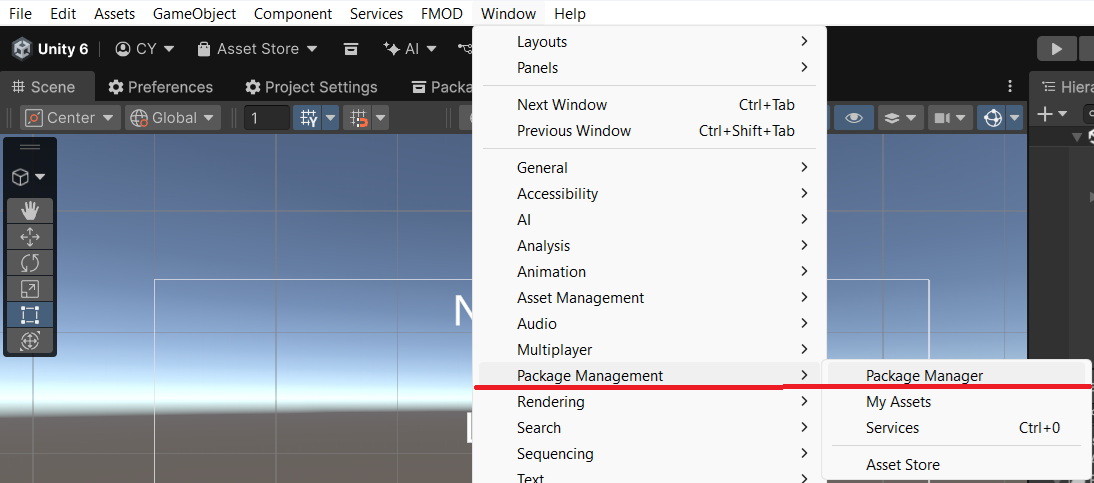
- In
My Assetssearch forFMOD for Unity - Add your desired Major version
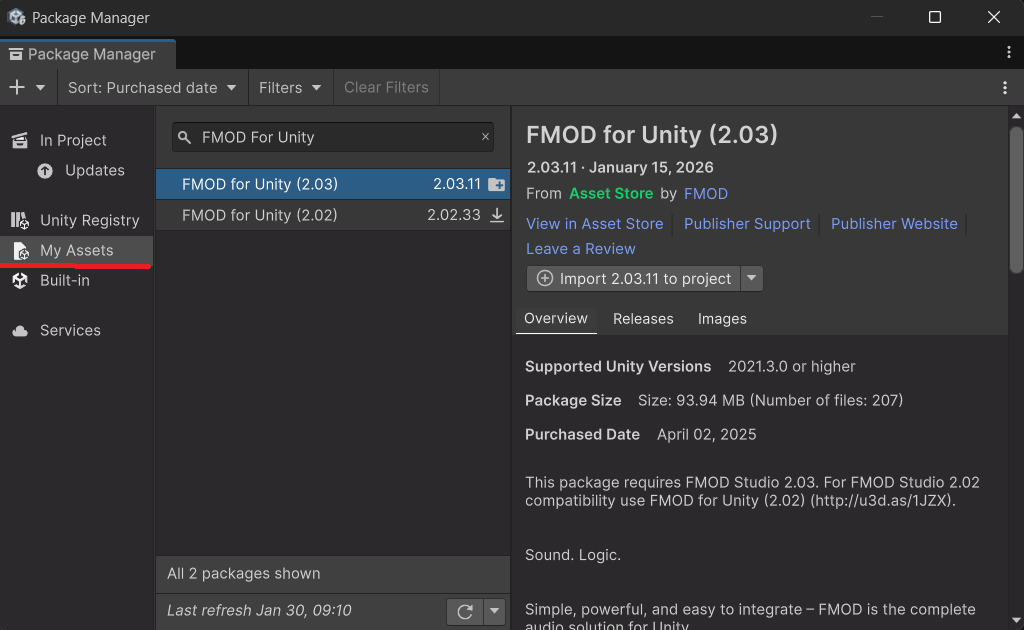
Or
Directly from FMOD Downloads
- Log in to www.fmod.com (creating an account is free & only requires an email)
- Head to FMOD Downloads to download specific sub versions if required.
- Navigate to Package Manager, then import Custom Package and import the contents of the FMOD for Unity zip.
Setting up the Integration
- Add the banks supplied from the Audio Team to [ProjectName]/Assets/FMOD/
Ensure the Platform names are included, for example [ProjectName]/Content/FMOD/Desktop - Navigate to the FMOD menu in Unity, then Edit Settings & Expand “Bank Import”
- Set Build Path to the folder you added the Bank files to.
If you’re using Multiple Platform Build, then ensure you point to the folder including the platform names, for eg “[ProjectName]/Content/FMOD/Desktop”
Note:
If you have devs working on different operating systems, we suggest adding a .gitattributes to avoid issues:
Assets/Plugins/FMOD/**/*.bundle text eol=lf
Assets/Plugins/FMOD/**/Info.plist text eol=lf
Version Control Ignore Setup
Git Ignore Setup
Add our starter ignore to your repository’s .gitignore
Keep in mind .gitignore files use a “Last Match Wins” heirarchy, so ensure our starter ignore entries are added at the bottom of your existing .gitignore.
SVN Ignore setup
If using SVN, you’ll need to grab the fmod_unity_svn_ignore.txt file, put it in your project’s parent folder and run the following commands from that same folder:
svn propset svn:ignore -F fmod_unity_svn_ignore.txt Assets/Plugins/FMOD
svn propset svn:ignore -F fmod_unity_svn_ignore.txt Assets/StreamingAssets
Further documentation:
Videos
Documentation
- FMOD for Unity User Guide
- FMOD for Unity - Adding Sounds
- FMOD for Unity - Visual Scripting
- FMOD for Unity - Scripting API